Prices from 30+ marketplaces
Compare prices and buy orders from more than 30 CS2 marketplaces, including Steam Community Market, CSFloat, Buff163, DMarket, and Skinport. Coverage varies by item and marketplace.
Compare CS2 skin prices in one table, find the most profitable deals.
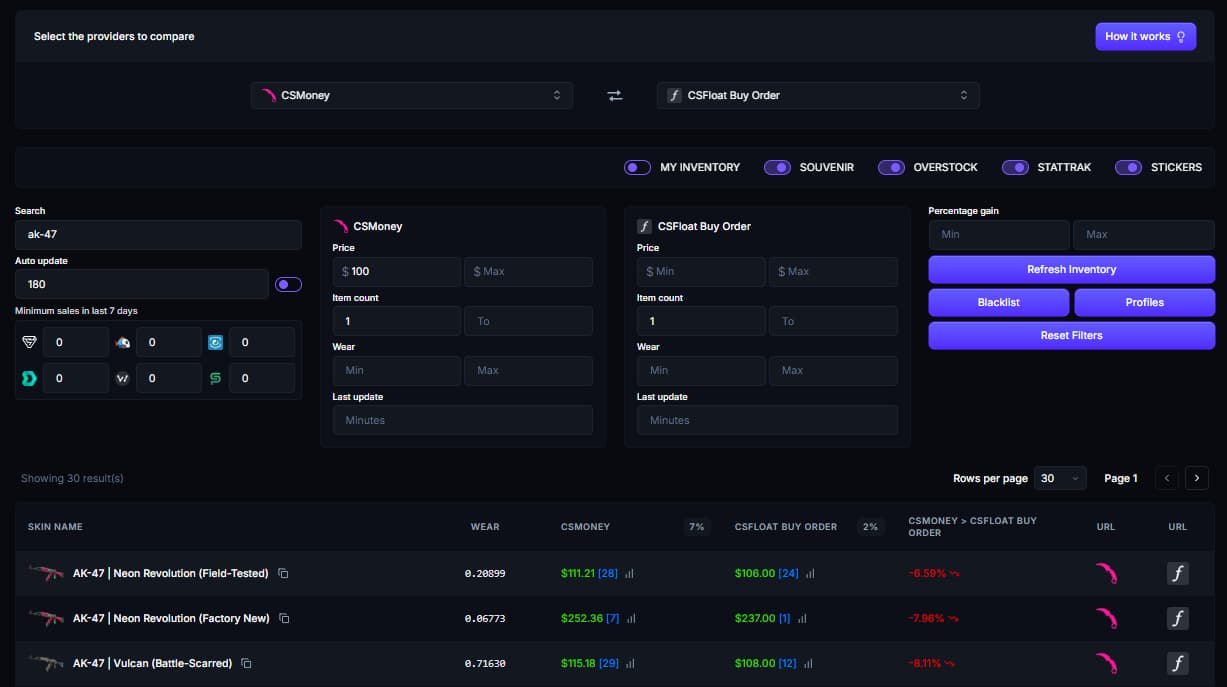
Sign in to choose marketplaces, set filters, and inspect the current results.
Start with the markets you can actually use, then narrow the table to items that fit your budget and trading plan.
Pick a source marketplace and the market you want to compare it with. Cheapest mode can search selected providers for the lowest source price.
Filter by price, wear, item count, recent sales, or update age. Exclude item types that do not fit the comparison you are making.
Review the percentage difference, then open both marketplaces and confirm the exact item, availability, fees, and buyer demand.
A useful CS2 skin price comparison needs more than two headline prices. Skinbase keeps market coverage, data age, selling fees, and wear details visible so you can judge each result before opening the listings.
Compare prices and buy orders from more than 30 CS2 marketplaces, including Steam Community Market, CSFloat, Buff163, DMarket, and Skinport. Coverage varies by item and marketplace.
Marketplace feeds are refreshed every minute. You can also filter each side by update age to remove older data before reviewing a price difference.
The percentage difference uses the comparison marketplace's default selling fee. You can replace it with your own fee, but deposit, withdrawal, payment, and currency-conversion costs should still be checked on the marketplace.
Factory New, Minimal Wear, Field-Tested, Well-Worn, and Battle-Scarred skins are compared as separate variants. When float data is available, you can set minimum and maximum wear values for either side.
Marketplace prices can move apart, but a visible spread is only a lead. Seller fees, withdrawal costs, thin demand, stale listings, and CS2 trade protection can erase it.
Use Skinbase to build a shortlist, then verify the item and both sides of the trade. A conservative resale price is more useful than the highest listing in the table.
Read more about CS2 skin arbitrage or review the markets in our CS2 marketplace comparison.
The full workspace gives you enough control to remove noisy results and focus on market pairs you can act on.
Compare one provider with another or search selected providers for the cheapest source.
Adjust provider fees and filter by price, quantity, recent sales, wear, or data age.
Include or exclude your inventory, Souvenir, Overstock, StatTrak, and sticker items.
Save filter profiles, blacklist unwanted item names, and refresh the table automatically.
A few things to know before you use a cross-market price gap as part of a trade decision.